Printerpoint Updates | Winter 2024


NEW
Days to Empty Counter for Ink and Toner Cartridges
Ever wonder how long it will be before a cartridge needs to be replaced? Of course you can use Printerpoint to see the current level of a cartridge, but we also now show an estimated “Days to empty” value for every cartridge in Printerpoint.
Just hover over a cartridge and display the estimated days remaining! In an upcoming release, we’ll give you the option to set supply alert thresholds based on time rather than cartridge level as well.

Additional Fields for Distributor Configuration
The backend of supply distribution is just as important as the front end. If you have a distributor that drop ships supplies to your customers, did you know that there is a special workflow in Printerpoint designed to make that process as efficient as possible?
We are regularly working with dealers and their distributors to find the best ways to optimize these workflows. If you work with a distributor and want to know more, get in touch.
IMPROVEMENTS
Added Support for HP DesignJet Smart Tank Models
In addition to the latest generation of HP DesignJet printers (XL 3800, T850, XT950), Printerpoint now supports new DesignJet models sold outside of the US, including the T858 and T908.
Usage Reporting on Brother Color Printers
We’ve added improvements to how we track meters on Brother color printers.
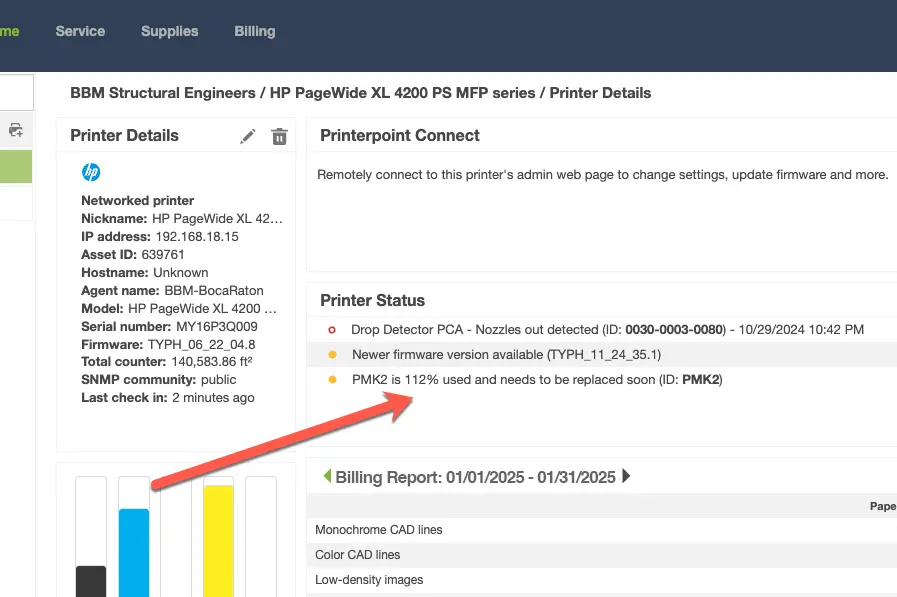
Allow HP PMK Alerts to Show Values >100%
Printerpoint reports when large format HP preventative maintenance kits need to be replaced, but in the past we assumed that when a PMK has a reported usage of more than 100%, it needs to be replaced immediately. But, the PMK percentage value is more like the “change oil” light in your car – not everyone follows the manufacturer’s recommended schedule. Some dealers wait until it is at 130% or 150% before they change it.
Previously, we’d alert you that it is time to change the PMK when it hits 100%, but now we tell you the percentage used, even when it's over 100%.
Also, on the latest HP models, you might have noticed that the PMKs show 100% used on new printers. This is an issue with how the printer reports the data, and HP is releasing a new firmware sometime in February that resolves this problem.
FIXES
UI Changes, Bug Fixes and More…
We’re constantly working to improve the user interface in Printerpoint to help you get your job done quickly and efficiently. To see the full list of recent changes, check out our knowledge base.
Got questions or feature requests? We’re just a click away!
